
Academic Program
This is used to add a program content type to the site. It also powers the program finder
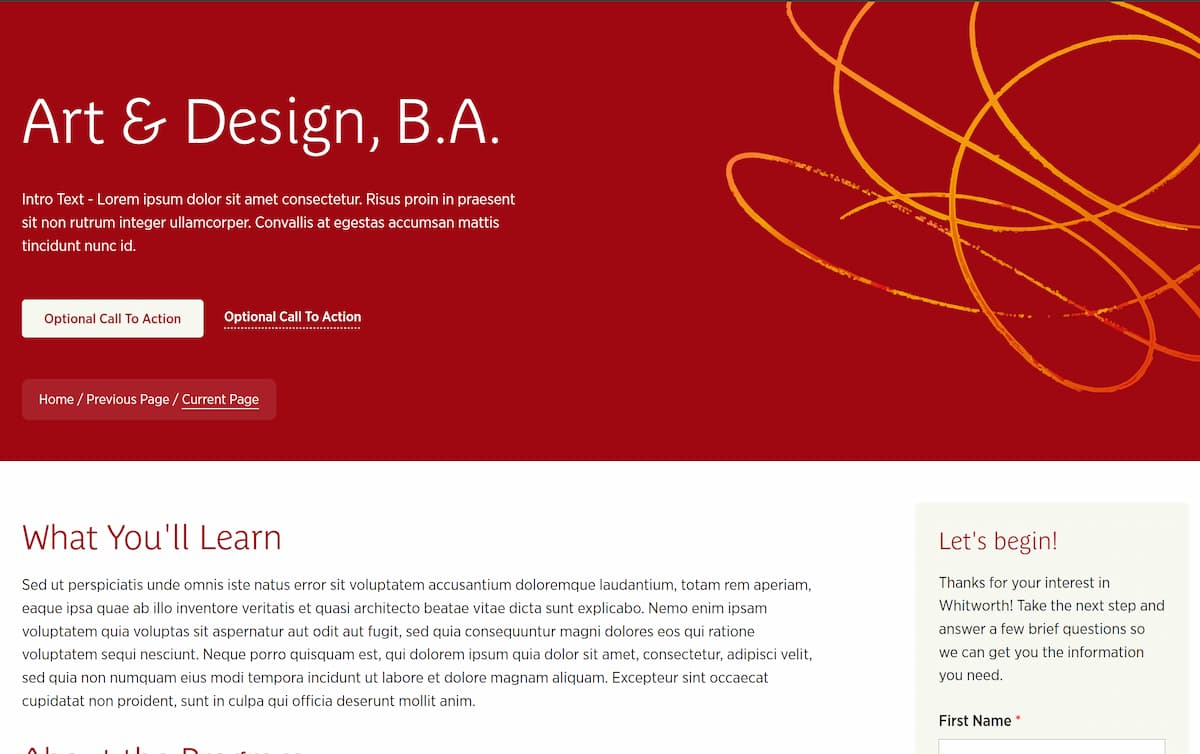
Content Type Details
- ID: 734
- Name: Academic Program
- Minimum user level: Contributor
- Compatible with page layouts: Fullwidth, Fullwidth with Breadcrumbs, Innerpage, Microsite
How to Use
The core program content type that powers both individual program pages and the Program Finder. Enter the program title, description, up to two buttons, and the three content tabs (What You'll Learn, About the Program, Program Facts). Use the classifier fields (Program Type, Area of Interest, Instructional Method, College) to ensure the program appears correctly in the finder. Add a Side Code for any form embed in the sidebar. This content type also generates the JSON used by the finder's filter functionality.
Content Type Elements Details
| Name | Description | Size | Type | Required | Conditionally Shown |
|---|---|---|---|---|---|
| Name | Displayed only in the Platform. Use a specific name that describes the content’s purpose | 80 Characters | Plain Text | Yes | No |
| Title | Enter the title for the hero, wrap the phrase/word in span tags to emphasize the text | 200 Characters | Plain Text | Yes | No |
| Description | Enter the description for the content | 1000 Characters | Plain Text | Yes | No |
| Button 1 Text | This is the clickable text | 150 Characters | Plain Text | Yes | No |
| Button 1 Link Type | Select the type of link Choose from options: Internal, External, Media | N/A | Select Box (List: Link Type) | Yes | No |
| Button Link 1 (Internal) | Select a section or piece of content within your site to send your visitor. | N/A | Section/Content Link | No | Yes |
| Button Link 1 (External) | Paste a full URL from another website (including https://). Only enter this if you are NOT entering an Internal Link. | 200 Characters | Plain Text | No | Yes |
| Button Link 1 (Media) | Select a PDF from the Media Library for a visitor to open. Only enter this if you are NOT entering an internal or external link. | N/A | Media | No | Yes |
| Button 1 Style | Select the button style Choose from options: Inverted, Inverted underlined, Underlined | N/A | Select Box (List: Button Style) | No | No |
| Button 2 Text | This is the clickable text | 150 Characters | Plain Text | Yes | No |
| Button 2 Link Type | Select the type of link Choose from options: Internal, External, Media | N/A | Select Box (List: Link Type) | Yes | No |
| Button Link 2 (Internal) | Select a section or piece of content within your site to send your visitor. | N/A | Section/Content Link | No | Yes |
| Button Link 2 (External) | Paste a full URL from another website (including https://). Only enter this if you are NOT entering an Internal Link. | 200 Characters | Plain Text | No | Yes |
| Button Link 2 (Media) | Select a PDF from the Media Library for a visitor to open. Only enter this if you are NOT entering an internal or external link. | N/A | Media | No | Yes |
| Button 2 Style | Select the button style Choose from options: Inverted, Inverted underlined, Underlined | N/A | Select Box (List: Button Style) | No | No |
| What You'll Learn | Enter the content for this section | 50000 Characters | HTML | No | No |
| About the Program | Enter the content for this section | 50000 Characters | HTML | No | No |
| Program Facts | Enter the content for this section | 50000 Characters | HTML | No | No |
| Program Type | Select value from list Choose from options such as: Undergraduate, Master's, Doctoral, Certificate, Endorsement | N/A | Select Box (List: Program Type) | Yes | No |
| Area of Interest | Select value from list Choose from options such as: Arts, Business, Communication, Education, Health Sciences | N/A | Select Box (List: Areas of Interest) | Yes | No |
| Instructional Method | Select value from list Choose from options: On-Campus, Online | N/A | Select Box (List: Instructional Method) | Yes | No |
| Keywords | Enter comma separated list | 5000 Characters | Plain Text | No | No |
| Side Code | Used to add a form to side content | 150000 Characters | Plain Text | No | No |