
Repeater – Testimonial Text
Used to add testimonial text item
Content Type Details
- ID: 723
- Name: Repeater – Testimonial Text
- Minimum user level: Contributor
- Compatible with page layouts: N/A
How to Use
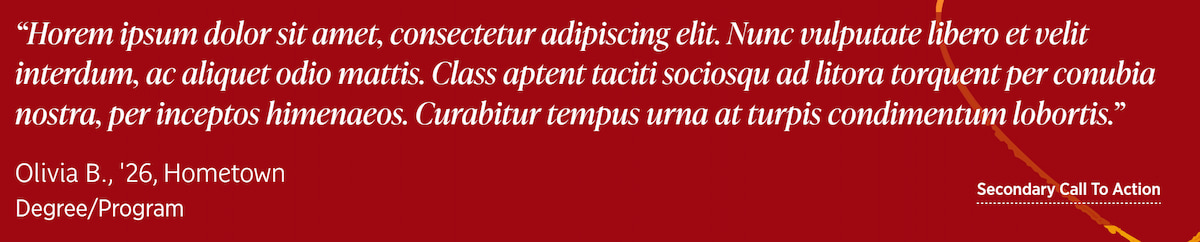
A text-only testimonial slide used by Carousel - Testimonial. Enter the quote, author name, department, and an optional button with style and link type.
Content Type Elements Details
| Name | Description | Size | Type | Required | Conditionally Shown |
|---|---|---|---|---|---|
| Name | Displayed only in the Platform. Use a specific name that describes the content’s purpose. | 80 Characters | Plain Text | Yes | No |
| Quote | Enter the quote | 1000 Characters | Plain Text | Yes | No |
| Author | Enter the author for the quote | 120 Characters | Plain Text | Yes | No |
| Department | Enter the department of the person who gave the quote | 120 Characters | Plain Text | No | No |
| Button Text | This is the clickable text | 150 Characters | Plain Text | No | No |
| Button Link Type | Select the type of link Choose from options: Internal, External, Media | N/A | Select Box (List: Link Type) | No | No |
| Button Link (Internal) | Select a section or piece of content within your site to send your visitor. | N/A | Section/Content Link | No | Yes |
| Button Link (External) | Paste a full URL from another website (including https://). Only enter this if you are NOT entering an internal link. | 200 Characters | Plain Text | No | Yes |
| Button Link (Media) | Select a PDF from the Media Library for a visitor to open. Only enter this if you are NOT entering an internal or external link. | N/A | Media | No | Yes |
| Button Style | Select the button style Choose from options: Inverted, Inverted underlined, Underlined | N/A | Select Box (List: Button Style) | No | No |